
On this page
How to create a new alias (park a domain) in cPanel
An alias domain lets you point extra domain names to your existing website without creating a separate site.
An alias domain (sometimes called a parked domain) lets you point additional domain names to your website, displaying the same content as your primary domain or an addon domain without needing a separate document root.
What is an alias domain?
Unlike subdomains or addon domains, alias domains do not have their own unique content or folder. Instead, they show the same content as an existing domain on your account.
For example, if your primary domain is example.com, you can use example.net or example.org as aliases so that visitors to either address see the same website.
Why use alias domains?
- Ensure customers can find your site using alternate domain names.
- Protect your brand by registering and pointing similar domains to your primary site.
- Support marketing campaigns by pointing specific domains to the same content.
- Send and receive email under a different domain name without hosting a separate site.
Before you start
Before creating an alias, make sure the domain is registered with a valid registrar and its nameservers are set to:
- ns1.kualo.net
- ns2.kualo.net
- ns3.kualo.net
- ns4.kualo.net
Alias domains cannot host unique content - they always display the same content as your primary domain or an addon domain.
How to create an alias domain
-
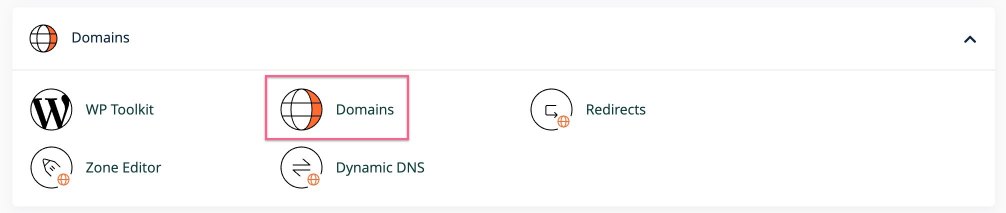
Log in to cPanel and click the Domains icon in the dashboard.
-
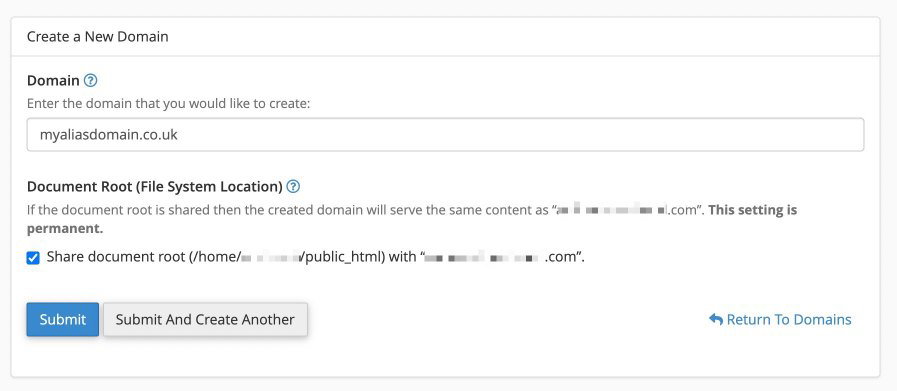
In the Domain field, type the full domain name you want to use as an alias - for example, example.net.
-
Check the document root setting. By default, Share document root is selected, which means the alias will display the same content as your primary domain. If you want the alias to point to an addon domain instead, update the document root to match that addon domain's folder.
-
Confirm that the alias domain's nameservers are pointing to Kualo (see above). If the domain is registered elsewhere, update its DNS settings before continuing.
-
Click Create.
What happens next?
- Content: Visitors to your alias domain will see the same content as the domain it points to. If you would prefer visitors to be redirected to your primary domain's URL rather than seeing the alias URL in their browser, you can set up a redirect in cPanel.
- SEO: Because alias domains share content with another domain, they do not improve search rankings directly. Their main purpose is to ensure visitors can reach your site via alternate domain names.
- DNS propagation: If your alias domain is already pointed to Kualo's nameservers, it should start working within a few minutes. If it does not, contact our support team for help.