
On this page
Searching through a database with phpMyAdmin
Use phpMyAdmin's Search feature to find specific words or values across tables in your MySQL database.
phpMyAdmin includes a built-in Search feature that lets you find specific words or values across one or more tables in a database without writing SQL manually.
Open the database in phpMyAdmin
- Log in to cPanel and open phpMyAdmin.
- In the left-hand panel, click the name of the database you want to search.
Run a search
- With the database selected, click the Search tab at the top of the main panel.
- Enter the word or value you want to find - for example, a city name.
- Use the options to refine your search:
- Choose a search type (for example, contains, exact match, or starts with).
- If your database has multiple tables, select which to include, or leave all selected to search everywhere.
- Click Go to run the search.
Review the results
phpMyAdmin lists each table where a match was found, with a count of matching rows. Click Browse next to a result to view the matching records.
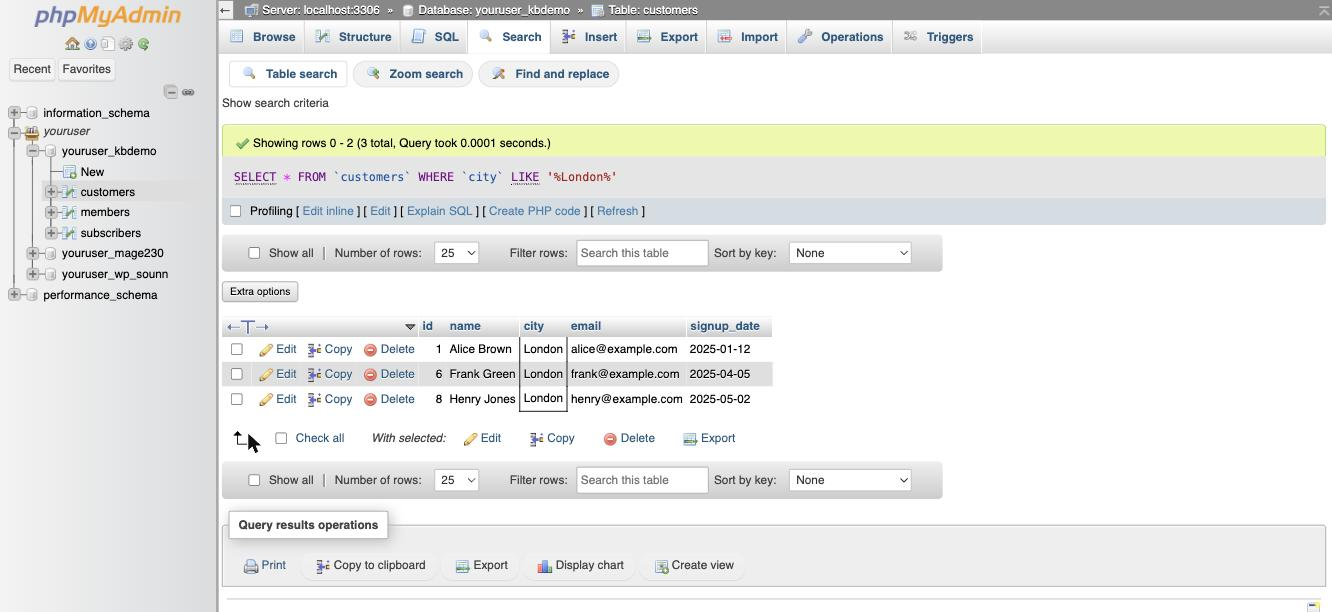
For large databases, narrowing the search to specific tables speeds things up considerably and reduces the chance of timing out. If nothing is found, phpMyAdmin shows a "No match" message - check your spelling and search type, then try again.
Was this helpful?
Your feedback helps us find gaps in the docs.
Thanks for the feedback!
Related articles
Databases
How to create a MySQL database in cPanel
Use the Database Wizard in cPanel to create a MySQL database, add a user, and grant privil...
Databases
Becoming familiar with databases in phpMyAdmin
A quick guide to the main features of phpMyAdmin and how to work with your databases and t...
Databases
Creating tables in a database with phpMyAdmin
Learn how to create a new table inside a MySQL database using phpMyAdmin in cPanel.
Databases
Deleting tables from a database with phpMyAdmin
Learn how to permanently delete a table from your database using phpMyAdmin in cPanel.
Still need a hand?
Real people, around the clock - start a chat or open a ticket and we'll help you put it right.