
On this page
Copying a database table with phpMyAdmin
Copy any database table in phpMyAdmin in just a few steps, with options to copy the structure, data, or both.
phpMyAdmin lets you copy any database table quickly, giving you the choice to copy the table structure, its data, or both.
How to copy a database table
-
Open phpMyAdmin and click the table you want to copy in the left-hand panel.
-
Click the Operations tab along the top of the page.
-
Scroll down to the Copy table to (database.table) section and choose what to copy:
- Structure only - copies the table layout with no rows
- Data only - copies the rows without recreating the table definition
- Structure and data - creates a complete duplicate
Enter a name for the new table, then click Go.
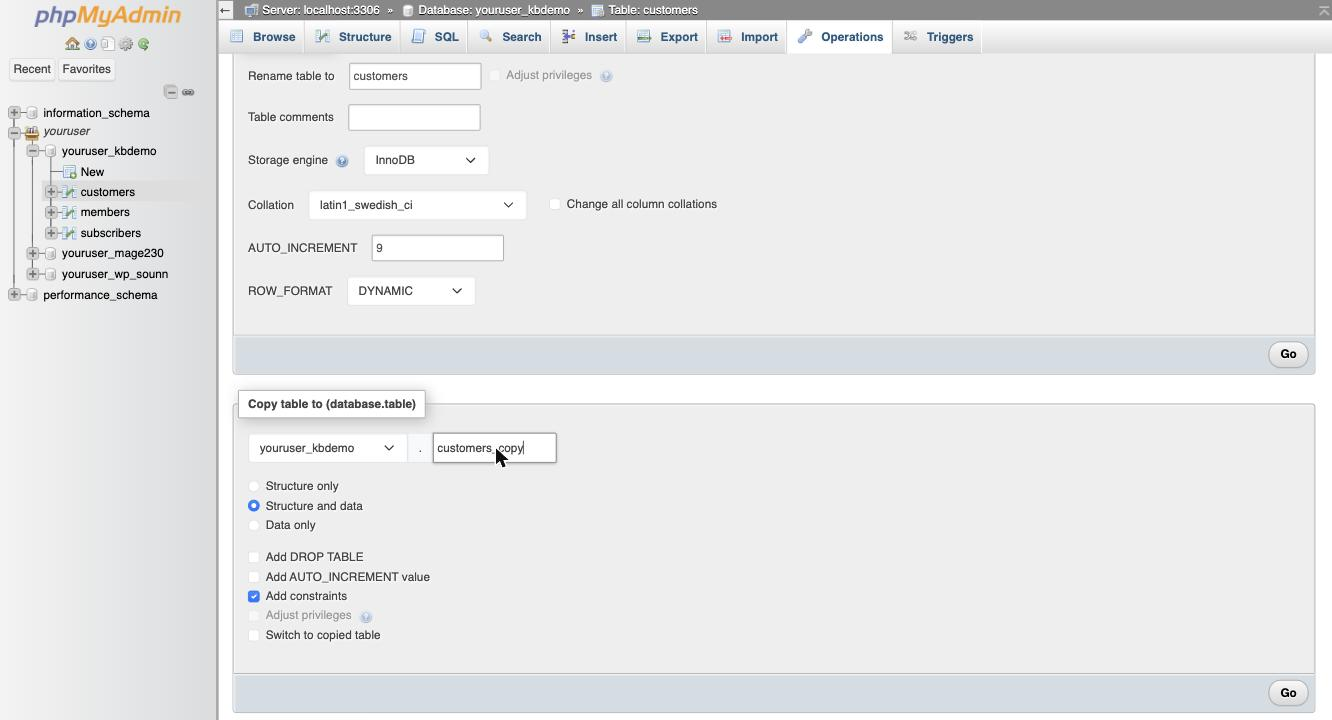
Copying a table creates a brand-new table with the name you provide. The original table is left untouched.
- phpMyAdmin confirms the operation and the new table appears alongside the original in the left-hand panel.
Was this helpful?
Your feedback helps us find gaps in the docs.
Thanks for the feedback!
Related articles
Databases
How to create a MySQL database in cPanel
Use the Database Wizard in cPanel to create a MySQL database, add a user, and grant privil...
Databases
Becoming familiar with databases in phpMyAdmin
A quick guide to the main features of phpMyAdmin and how to work with your databases and t...
Databases
Creating tables in a database with phpMyAdmin
Learn how to create a new table inside a MySQL database using phpMyAdmin in cPanel.
Databases
Deleting tables from a database with phpMyAdmin
Learn how to permanently delete a table from your database using phpMyAdmin in cPanel.
Still need a hand?
Real people, around the clock - start a chat or open a ticket and we'll help you put it right.