
On this page
How to update your contact information in cPanel
Keeping your cPanel contact email address current ensures you receive important system alerts - from disk and bandwidth warnings to SSL renewal failures and mailbox quota notices.
Keeping your contact information up to date in cPanel ensures you receive important alerts about your hosting account. cPanel uses this address independently of your MyKualo login email - it is a separate system. When you first signed up, we set your cPanel contact address to the email you used at registration, but the two are not linked. If you change one, the other does not update automatically.
Why this matters
cPanel sends notifications directly to the address stored here. If that address is out of date or belongs to a mailbox you no longer check, you could miss alerts that need prompt action. Common notifications include:
- Disk quota warnings - your hosting account is approaching its storage limit. If you hit the limit, your site may stop accepting form submissions, file uploads, or database writes.
- Bandwidth warnings - your account is approaching its monthly transfer limit.
- Email account (mailbox) quota warnings - an individual mailbox on your account is nearly full. When a mailbox hits its quota, incoming mail is bounced back to the sender. You will not receive those messages, and senders may not realise their email has failed.
- SSL certificate renewal failures - cPanel's AutoSSL renews your SSL certificates automatically, but renewal can fail if your domain is not resolving correctly, if Cloudflare settings interfere, or if there is a temporary validation problem. Without a working contact address, you will not know your certificate has expired until visitors start seeing browser security warnings.
- Cron job failure notices - if a scheduled task fails, cPanel can email you the error output so you can investigate.
- Security and account notices - including login alerts and other system events.
This contact address is separate from your MyKualo account email. Updating it here does not change your billing or login email at my.kualo.com, and vice versa.
Update your contact information
-
Log in to cPanel and click Contact Information (in the Preferences section).
-
Enter a correct, working email address in the primary email field. If you have a second address, add it in the backup field so you still receive notifications if there is a problem with the first.
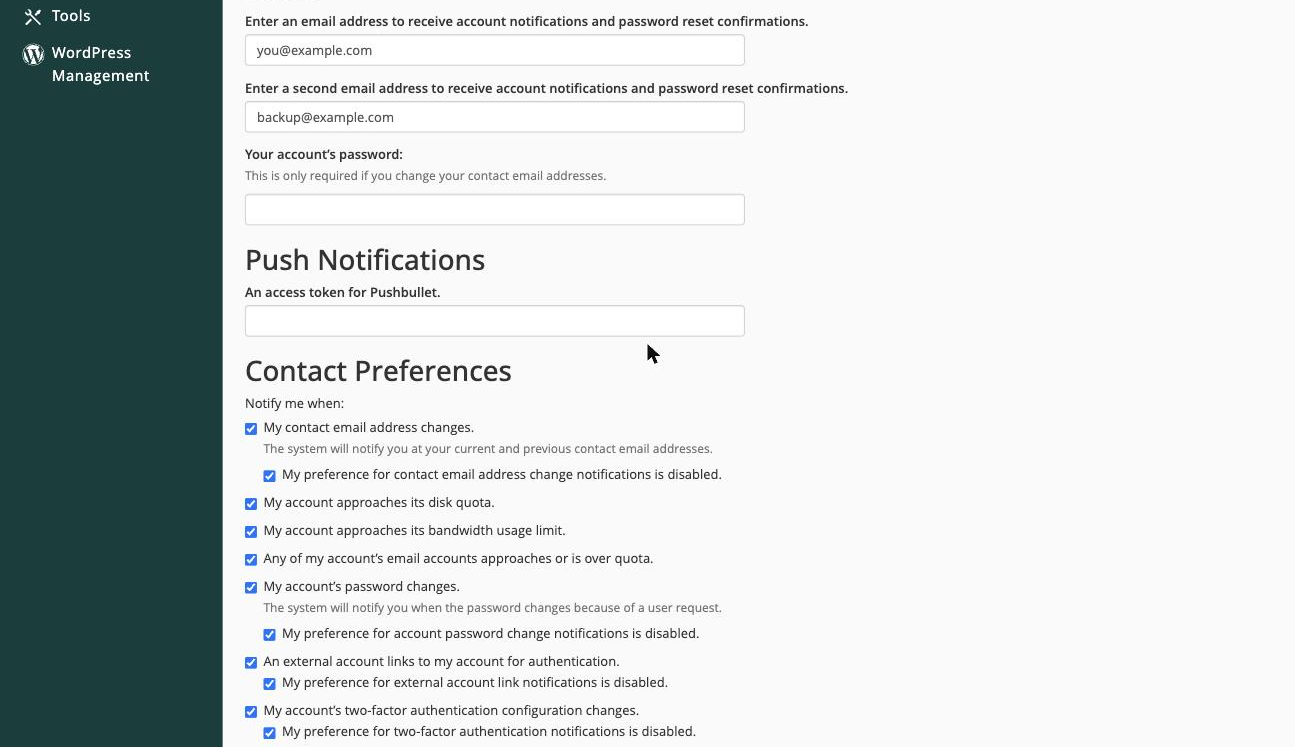
Use an address outside your hosting account if possible - for example, a Gmail or Outlook address. If your hosting account has a problem, a contact address hosted on the same account may also be affected.
-
Review the notification options - you can choose to be alerted when you approach your disk quota, bandwidth usage limit, or email account quota.
-
Click Save to apply your changes.
It is worth enabling all three quota notifications. Early warnings give you time to act before your account is affected.
Keeping your MyKualo email up to date
Remember that your MyKualo email address is managed separately at my.kualo.com. That address is used for billing notices, support correspondence, and two-factor authentication. Make sure both addresses are current so you do not miss communications from either system.