
On this page
What is a wildcard subdomain and how to create it in cPanel?
A wildcard subdomain lets you point every subdomain of a domain to a single folder in your cPanel account.
A wildcard subdomain (also called a wildcard DNS entry) lets you point all subdomains of a domain - both existing ones and any that do not yet exist - to a single folder in your cPanel account.
For example, if you set up a wildcard for *.domain1.com, then test.domain1.com, forum.domain1.com, and any other subdomain will all serve content from the same document root. This is useful for multisite web applications or any setup where you want every subdomain to resolve to the same location.
Wildcard subdomains only work for domains whose DNS is hosted with Kualo (i.e. the domain points to Kualo's nameservers). See Updating nameservers at Kualo if your domain is registered with us and you need to update them.
How a wildcard subdomain works
The wildcard character * acts as a catch-all prefix. So *.domain1.com matches anything.domain1.com and routes it to whichever folder you specify as the document root.
Creating a wildcard subdomain in cPanel
- Log in to cPanel.
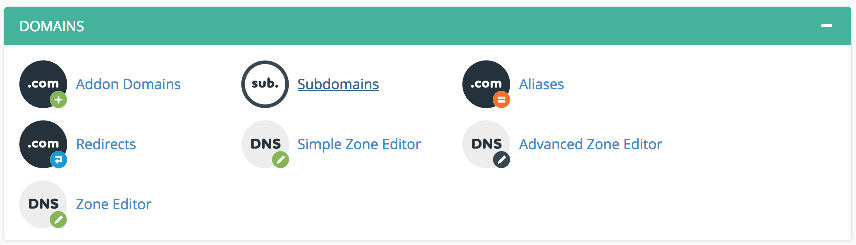
- Go to the Domains section and click Subdomains.
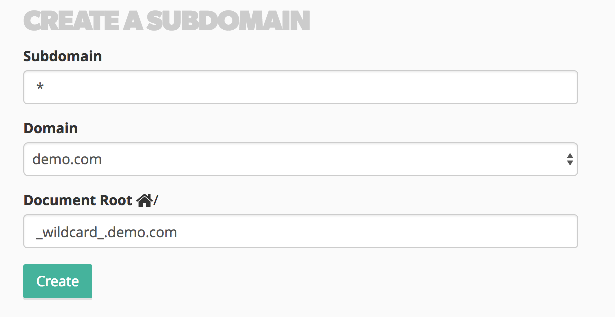
- In the Subdomain field, enter
*as the subdomain name. - Select your domain from the drop-down list.
- In the Document Root field, enter the folder path you want all wildcard requests to point to, or accept the suggested path.
- Click Create.
Once created, allow up to four hours for the DNS change to propagate across the internet. After that, any subdomain under your domain will resolve to the folder you specified.
If you need any help, feel free to contact the Kualo support team.