
On this page
Running SQL queries on a database with phpMyAdmin
phpMyAdmin lets you run SQL queries directly against your database tables from within cPanel.
phpMyAdmin lets you run SQL queries directly against your database tables, giving you full control over your data beyond what the point-and-click interface offers.
Opening the SQL query window
There are two ways to reach the SQL query window in phpMyAdmin.
From the database view:
- Log in to cPanel and open phpMyAdmin.
- In the left-hand panel, click the database you want to work with.
- Click the SQL tab at the top of the main panel.
From the table view:
- In the left-hand panel, click the specific table you want to query.
- Click the SQL tab. phpMyAdmin pre-fills a basic
SELECTstatement for that table, which you can edit or replace.
Running a query
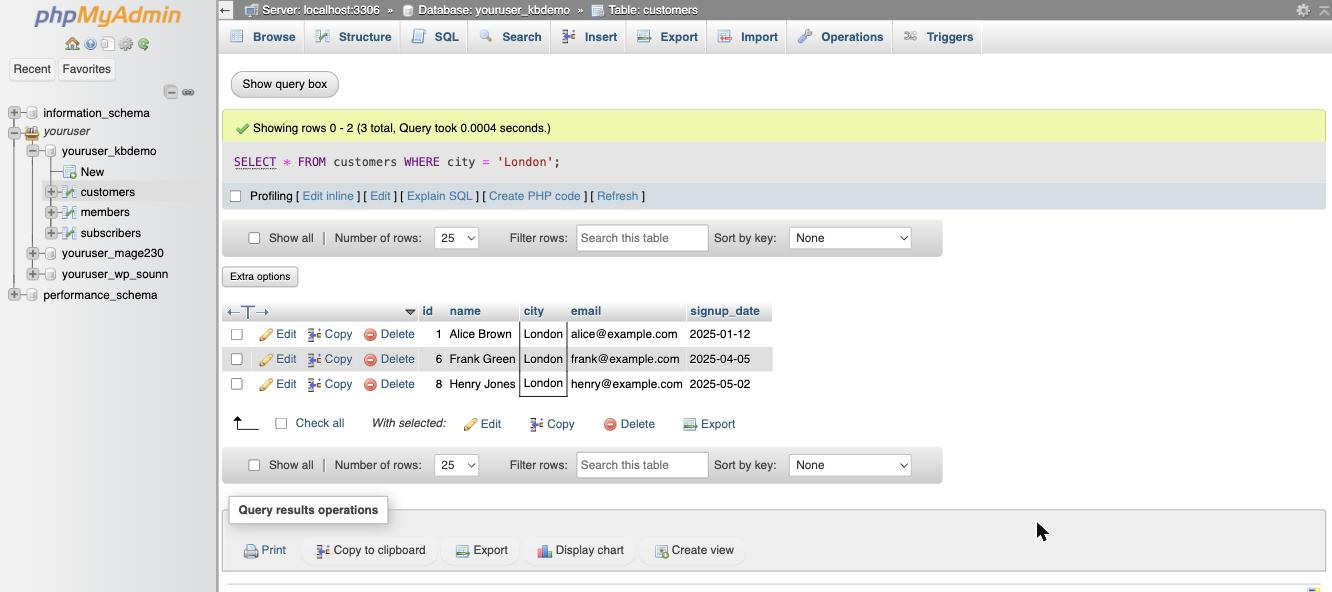
- Type your SQL command into the query box. For example, to find every customer in London:
SELECT * FROM customers WHERE city = 'London';
- Click Go to run it. phpMyAdmin shows the matching rows below, along with how many were returned.
SQL commands such as DROP, DELETE, and ALTER change or remove data and cannot be undone. Always back up your database before running them - you can generate a backup from the Export tab in phpMyAdmin.
Learning SQL syntax
For a full reference on SQL syntax, see the MySQL documentation.
Was this helpful?
Your feedback helps us find gaps in the docs.
Thanks for the feedback!
Related articles
Databases
How to create a MySQL database in cPanel
Use the Database Wizard in cPanel to create a MySQL database, add a user, and grant privil...
Databases
Becoming familiar with databases in phpMyAdmin
A quick guide to the main features of phpMyAdmin and how to work with your databases and t...
Databases
Creating tables in a database with phpMyAdmin
Learn how to create a new table inside a MySQL database using phpMyAdmin in cPanel.
Databases
Deleting tables from a database with phpMyAdmin
Learn how to permanently delete a table from your database using phpMyAdmin in cPanel.
Still need a hand?
Real people, around the clock - start a chat or open a ticket and we'll help you put it right.