
On this page
How to set up an auto-responder in cPanel
Set up an email auto-responder in cPanel to send automatic replies to any incoming messages.
An auto-responder automatically sends a reply to anyone who emails a specified address on your account - useful for out-of-office notices, acknowledgements, or any situation where you need an instant automated response.
Setting up an auto-responder
-
Log in to cPanel and click the Autoresponders icon in the Email section.
-
Click Add Autoresponder.
-
Fill in the form:
- Character Set - leave as
utf-8unless you have a specific reason to change it. - Interval - the number of hours to wait before replying again to the same sender (enter
0to respond to every message). - Email - the address you want the auto-responder to apply to (for example,
[email protected]). - From and Subject - these appear in the automatic reply that recipients receive.
- Body - the text of your auto-reply message.
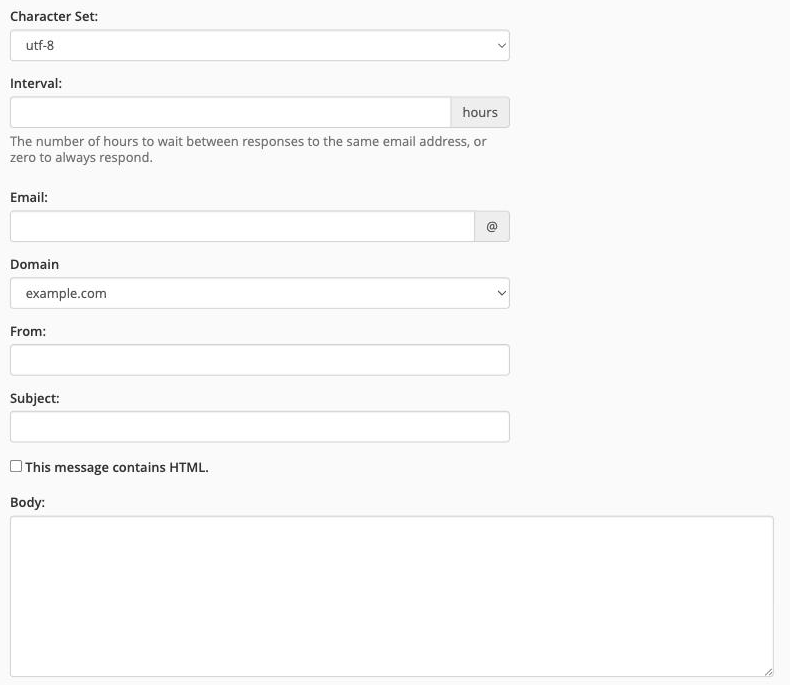
- Character Set - leave as
-
Click Create/Modify to save the auto-responder.
The auto-responder is now active. Anyone who sends a message to that address will receive your automatic reply.
To edit or delete an existing auto-responder, return to the Autoresponders page and use the Edit or Delete links next to the relevant entry.
Was this helpful?
Your feedback helps us find gaps in the docs.
Thanks for the feedback!
Related articles
Managing email in cPanel
How to create an email account in cPanel
Create as many email accounts as your hosting plan allows directly from cPanel, set sensib...
Managing email in cPanel
How to set up email forwarding in cPanel
Email forwarders in cPanel let you automatically send a copy of all mail arriving at one a...
Managing email in cPanel
How to set up email filters in cPanel
Email filters in cPanel let you automatically sort, redirect or delete incoming messages b...
Managing email in cPanel
How to set your default address in cPanel
Set a default email address in cPanel to catch any mail sent to addresses that don't exist...
Still need a hand?
Real people, around the clock - start a chat or open a ticket and we'll help you put it right.