
On this page
Windows Live Mail - configuring IMAP folders
Configure IMAP folder paths in Windows Live Mail to keep sent, deleted, and draft messages in sync across multiple devices.
When you configure an email account using Windows Live Mail, you may need to adjust a few settings so that your sent and deleted mail is visible across two or more devices.
Configure IMAP folder settings
-
Open Windows Live Mail.
-
Click Tools, then Accounts from the menu bar.
If the menu bar is not visible, hold down Alt, press T, then release both keys.
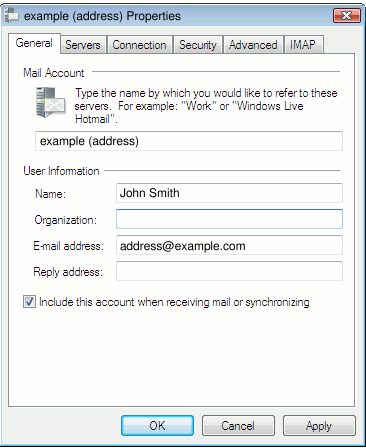
- In the Accounts window, click the account you want to adjust to highlight it, then click Properties.
-
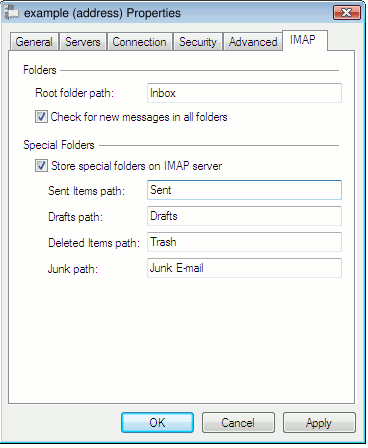
Click the IMAP tab at the top right of the Properties window.
-
Enter
INBOXin the Root folder path field. -
Tick Check for new messages in all folders.
-
To have Windows Live Mail save drafts, deleted messages, and copies of sent messages on the IMAP server (rather than on your PC), configure the following:
a. Tick Store special folders on IMAP server. Without this, drafts, deleted items, and sent messages are stored locally in what Windows Live Mail calls "Storage Folders".
b. Enter
Sentin the Sent Items Path field.c. Enter
Draftsin the Drafts path field.d. Enter
Trashin the Deleted Items path field.e. Set the Junk path to whichever folder name you prefer.
The values Sent, Drafts, and Trash are case sensitive. Enter them exactly as shown - one capital letter followed by lowercase - not as sent, SENT, or any other variation.
The completed screen should look something like this:
- Click OK to close the Properties window, then click Close to close the Accounts window. If Windows Live Mail asks whether you would like to refresh your folder list, choose Yes. You may also need to restart Windows Live Mail for the changes to take effect.