
On this page
How to set up email forwarding in cPanel
Email forwarders in cPanel let you automatically send a copy of all mail arriving at one address to another address. Learn how to set them up, and how to check multiple mailboxes in one place using a mail client.
Email forwarders in cPanel let you automatically send a copy of all mail arriving at one address to another address - handy when you have several addresses but only want to check one inbox.
Think carefully before forwarding to external providers. Forwarding to Gmail, Outlook, Yahoo or similar services can cause spam and bulk mail (such as newsletters) to be relayed through our servers. This may cause those providers to flag your domain or our servers as a spam source, harming your email deliverability.
We do not recommend forwarding your email to Gmail or other external services.
Forwarders work best for routing generic addresses such as [email protected] or [email protected] to multiple recipients within your organisation, so a team can receive enquiries without sharing a single mailbox login.
Setting up an address forwarder
-
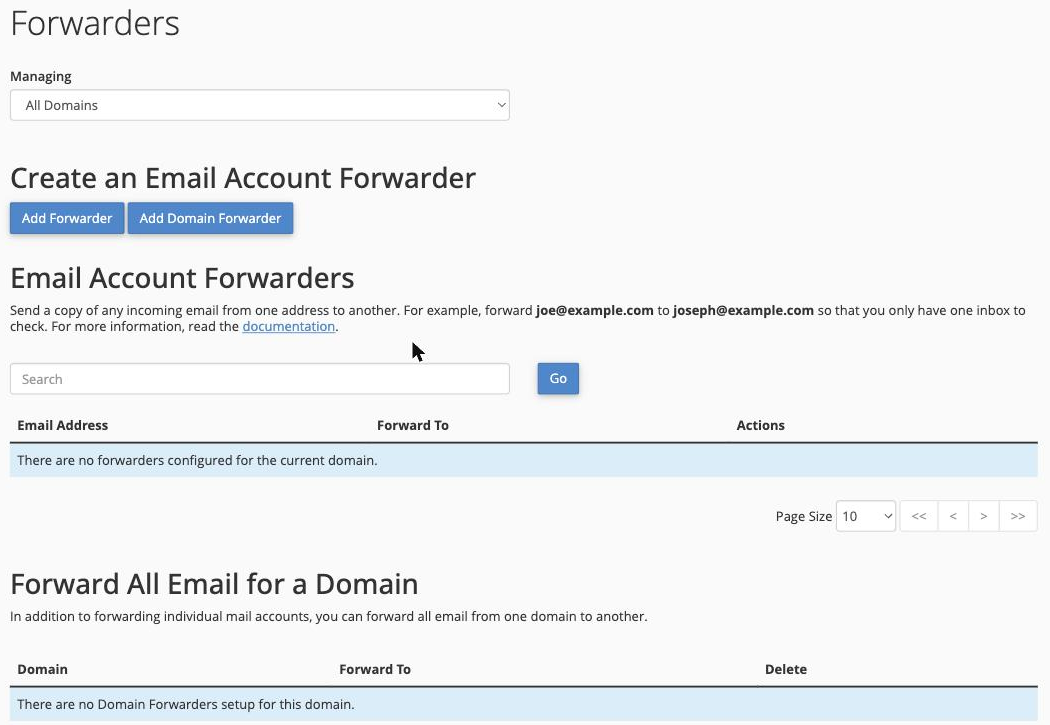
Log in to cPanel and click the Forwarders icon (in the Email section).
-
Click Add Forwarder.
-
In the Address to Forward field, enter the address you want to forward from (for example,
[email protected]), then enter the destination address you want mail forwarded to.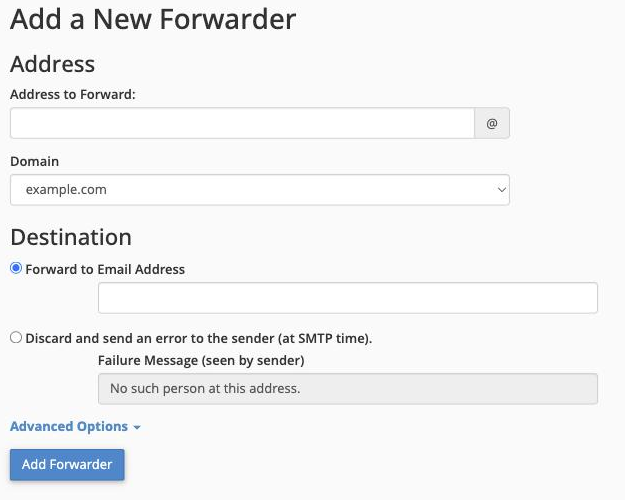
-
Click Add Forwarder to save.
The forwarder is active immediately. You can return to the Forwarders page at any time to add further forwarders or delete existing ones - your existing forwarders are listed there.
Setting up a domain forwarder
A domain forwarder redirects all mail sent to every address at a specific domain to another domain. To set one up, scroll down to the Domain Forwarders section on the Forwarders page, click Add Domain Forwarder, then follow the on-screen prompts.