
On this page
Getting started with ProSite
ProSite is Kualo's drag-and-drop website builder, letting you create responsive, professional websites from over 100 templates.
ProSite is Kualo's drag-and-drop website builder - the quickest way to create a beautiful, responsive website without writing any code. Whether you run a small business, freelance as an artist, or anything in between, there is a fully customisable template to get you started.
Before you begin
We strongly recommend reading about how to lay content out in ProSite before you dive in. It covers the fundamentals of using the builder effectively and will save you time later. You may also want to watch the video series on building a website from scratch with ProSite.
Logging in and choosing a template
Once you have logged in to ProSite, the first step is to choose a template. There are over 100 designs to pick from, plus pre-built blocks you can drop in to speed up your layout - no need to build everything from scratch.
The main menu
The ProSite main menu is divided into five blocks.
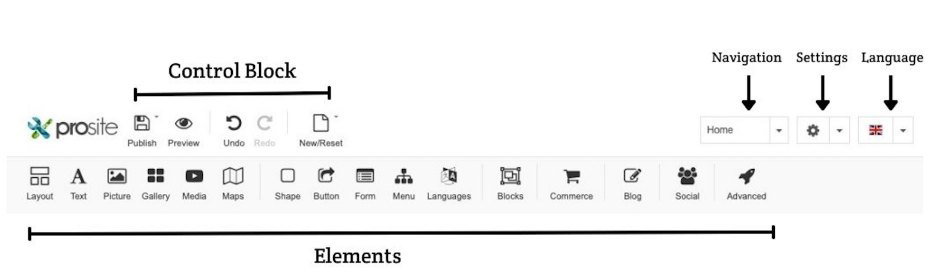
- Control block - publish, save a draft, or back up and restore your site. Also lets you undo or redo changes, and change or reset your template.
- Navigation - select the page you want to edit, add new pages and sub-menu items, or optimise your site for search engines.
- Settings - access your site-wide settings.
- Languages - switch the language of the ProSite interface. See how to develop a site that works in multiple languages.
- Elements - all the modules you can drag and drop on to your pages, including text, pictures and galleries, YouTube videos, music, shapes, buttons, contact forms, menus, maps, and more advanced modules.
Previewing across devices
You can preview your site on desktop, tablet, and mobile at any time using the device previewer.

Check how your site looks across all devices as you build each section, not just at the end. That way you can safely duplicate sections and pages knowing they will look great everywhere, rather than having to go back and fix every section once the build is complete.
Getting help
If you run into anything not covered in the knowledgebase, our support team is available 24/7 - just open a ticket via the helpdesk in your MyKualo account.