
On this page
How to add a social share button
Add a social share button to your ProSite website so visitors can share your content to popular social networks.
Social share buttons let visitors post a link to your page on networks like Facebook, Twitter, LinkedIn, Pinterest and WhatsApp with a single click - a quick way to extend the reach of your content. Here is how to add one in ProSite.
Add the share widget to your page
-
Launch ProSite from your cPanel.
-
Navigate to the page where you want the share buttons to appear.
-
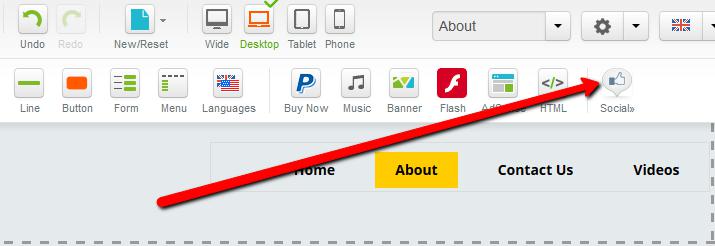
Click the Social button in the element panel.
-
Hover over the Share element, then drag and drop it onto your page.

Configure the share widget
-
Double-click the newly added Share widget, or click the Pencil icon and choose Properties.
-
In the Properties panel, select the button size and choose which social networks to display.
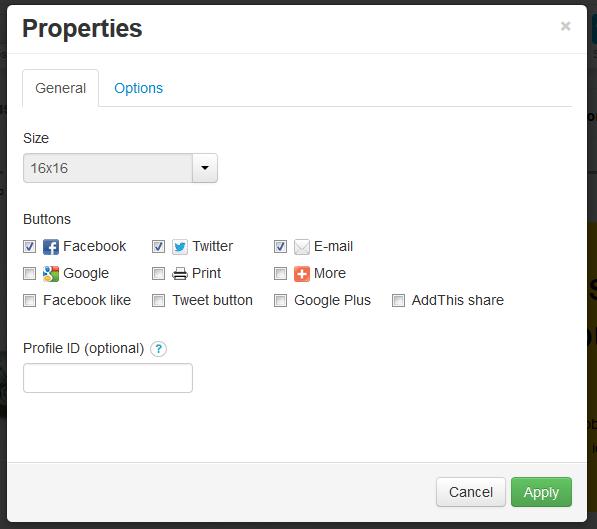
The Profile ID field is optional. It is only needed if you want analytics reports through AddThis.com - covering what content was shared, which networks it was shared to, geographic data, audience interests and more. To use this feature, sign up for a free account at addthis.com and copy your Profile ID into this field.
-
Use the Options tab to adjust the widget size and position, and to control whether it appears on all pages or only specific ones.
-
Click Apply to save your changes.