
On this page
How to place content so it appears on every page
Use ProSite's visibility panel to control which pages any element appears on, including site-wide headers and footers.
Some content - your header and footer, for example - needs to appear on every page of your site. ProSite lets you control this through the visibility panel on each element.
How page-wide visibility works
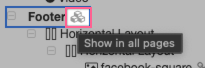
By default, your header and footer are already set to appear on every page. In the Page Structure view, you will see a special icon on these elements indicating they are site-wide.
Changing which pages an element appears on
- Select the element in the Page Structure view.
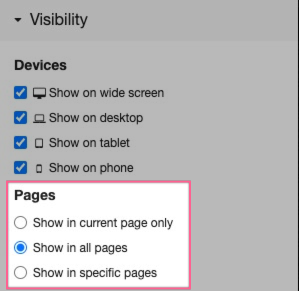
- Scroll down to Visibility Options in the panel on the left.
- Choose one of the available options - you can display the element on all pages, on specific pages, or on one page only.
- Click Save to apply your changes.
Any visibility change only takes effect once you have saved the page.
Was this helpful?
Your feedback helps us find gaps in the docs.
Thanks for the feedback!
Related articles
Building your pages
How to add a new page
Add a new page to your ProSite website in a few steps using the built-in Site Builder tool...
Building your pages
How to add / configure your website navigation
Add and configure a navigation menu on your ProSite site - horizontal or vertical, respons...
Building your pages
How to add a sub-menu
Add a drop-down sub-menu in ProSite by nesting menu items under a parent page in the Edit...
Building your pages
How to add tabs to your website
Tabs let you organise content into clearly labelled sections, keeping your pages tidy and...
Still need a hand?
Real people, around the clock - start a chat or open a ticket and we'll help you put it right.