
On this page
How to optimise your site for search engines
Use the ProSite builder's SEO tab to set page titles, descriptions, keywords and user-friendly URLs for each page of your site.
Use the ProSite builder's built-in SEO settings to help search engines understand each page of your site. You can set a title, description, keywords and a user-friendly URL for every page.
Set up SEO for a page
- Launch the Site Builder tool from your cPanel.
- Click the Settings icon in the top menu and choose Pages.
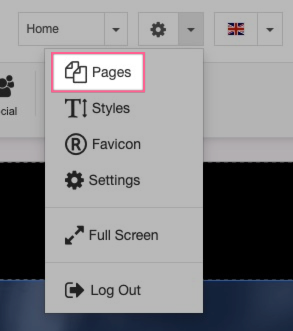
- Select the page you want to optimise, then click the SEO tab.
- Fill in the Page title, Description, Keywords and User-friendly URL fields (see guidance below).
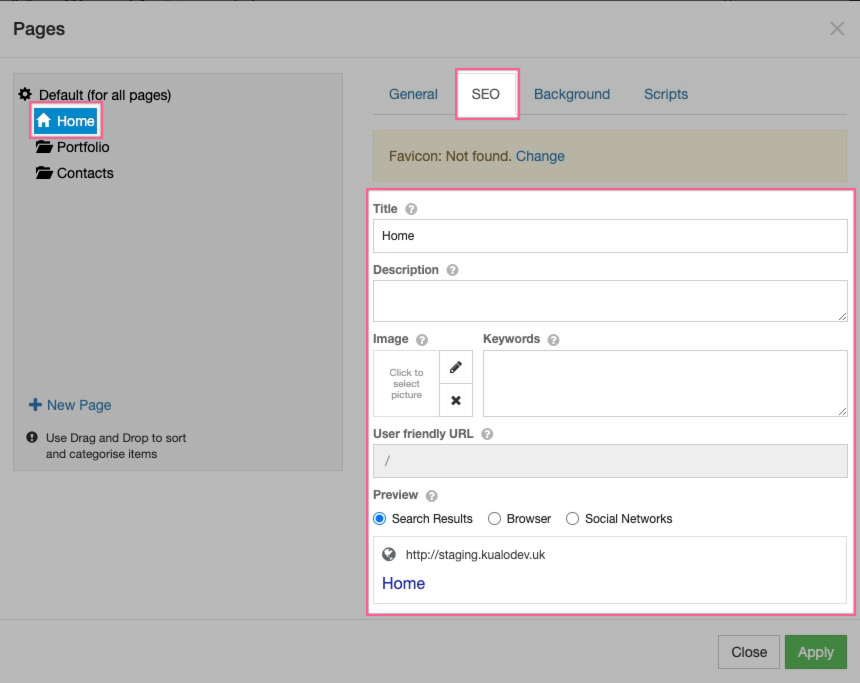
- Click Apply.
Tips for each field
Page title
The title is the clickable headline that appears in search results. It gives users a quick sense of what the page is about and is often the main factor in whether someone clicks your result. Make it clear, specific and relevant to the page content.
Description
Write one or two short sentences that summarise what is on the page. Keep it under 60 words. Search engines sometimes display this text beneath the title in results, so make it readable and useful to a real person.
Keywords
Choose a small number of short words or phrases that describe what makes this page distinct. There is no magic number, but repeating the same words or adding more than you genuinely need brings no benefit.
User-friendly URL
URLs should use readable words rather than long ID numbers wherever possible. For example, for an About Us page you might enter about-us. Your home page URL defaults to / and cannot be changed.
For a deeper understanding of SEO principles, Google's Search Engine Optimization Starter Guide is a thorough and free resource - search for it on the Google Search Central website.