
On this page
How to add a Facebook Like button
Add a Facebook Like button to any page of your ProSite website using the Social widget in the Site Builder.
You can add a Facebook Like button to any page of your ProSite website in just a few steps using the built-in Social widget.
Add the Like widget to your page
- Launch the Site Builder tool from your cPanel.
- Go to the page where you want to add the Facebook Like button.
- Click the Social button in the element panel.
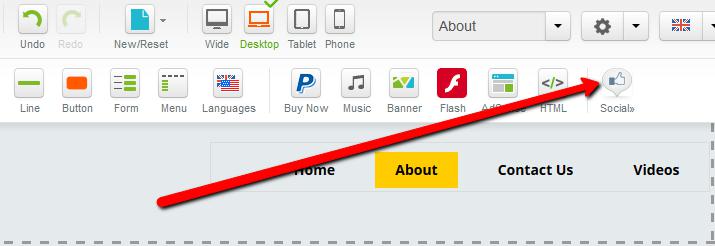
- Hover over the Like element, then drag and drop it onto your page.
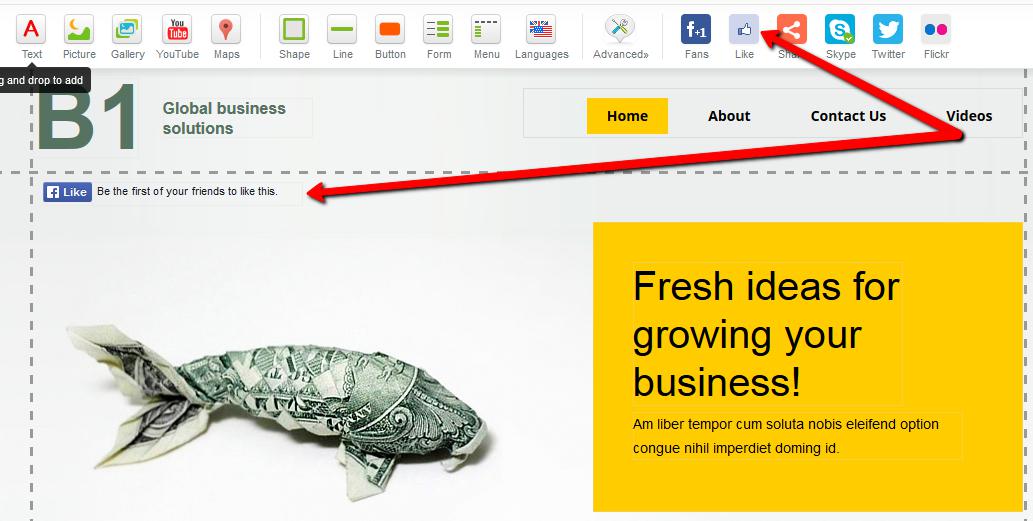
Configure the Like button
- Double-click the newly added Like widget, or click the Pencil icon and choose Properties.
- In the Properties dialog, enter your website address in the Profile URL (required) field - for example,
http://www.mylovelywebsite.com.
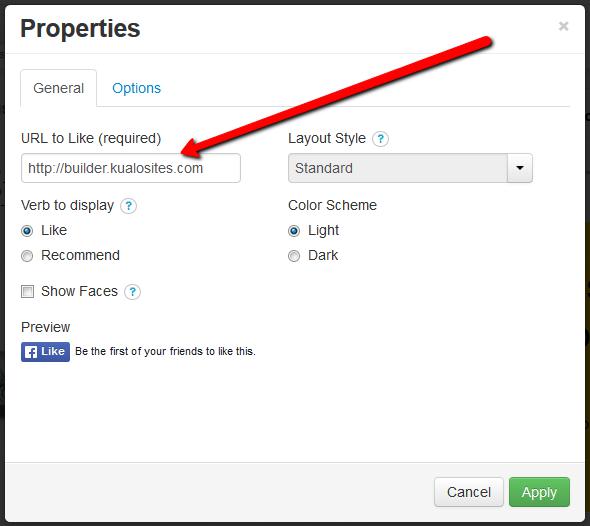
Under the General tab you can also configure the following options:
- Verb to display - the action word shown on the button.
- Show faces - displays profile pictures below the button.
- Layout style - controls the size and amount of social context shown alongside the button.
- Colour scheme - choose between a light or dark style.
The Options tab lets you adjust the button's position and choose whether it appears on all pages or specific pages of your site.
- Click Apply to save your changes.
Was this helpful?
Your feedback helps us find gaps in the docs.
Thanks for the feedback!
Related articles
Widgets & elements
How to use the image gallery widget
ProSite includes a built-in image gallery widget that makes adding image galleries to your...
Widgets & elements
How to use the map widget
Add a working Google Maps widget to your ProSite website by generating a Google Maps API k...
Widgets & elements
How to use the YouTube widget
Add a YouTube video to your ProSite page - either as a playable embed using the Media widg...
Widgets & elements
How to upload a photo
Add a photo to your ProSite page by dragging in the Picture element, then choose or upload...
Still need a hand?
Real people, around the clock - start a chat or open a ticket and we'll help you put it right.