
On this page
How to integrate Google Analytics
Add your Google Analytics tracking ID to your ProSite website in just a few steps.
Connect Google Analytics to your ProSite website to start tracking visitor data. You will need a Google Analytics tracking ID before you begin.
If you do not yet have a Google Analytics tracking ID, follow the Google Analytics setup guide to create one.
Adding your tracking ID
- Launch the Site Builder tool from your cPanel.
- Click the Settings icon in the top menu and choose Settings.
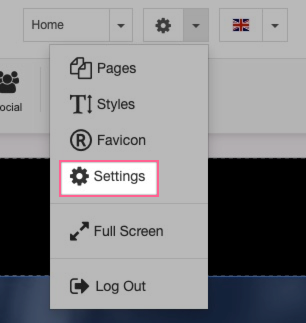
- Click the Analytics tab.
- Enter your Google Analytics Tracking ID in the corresponding field.
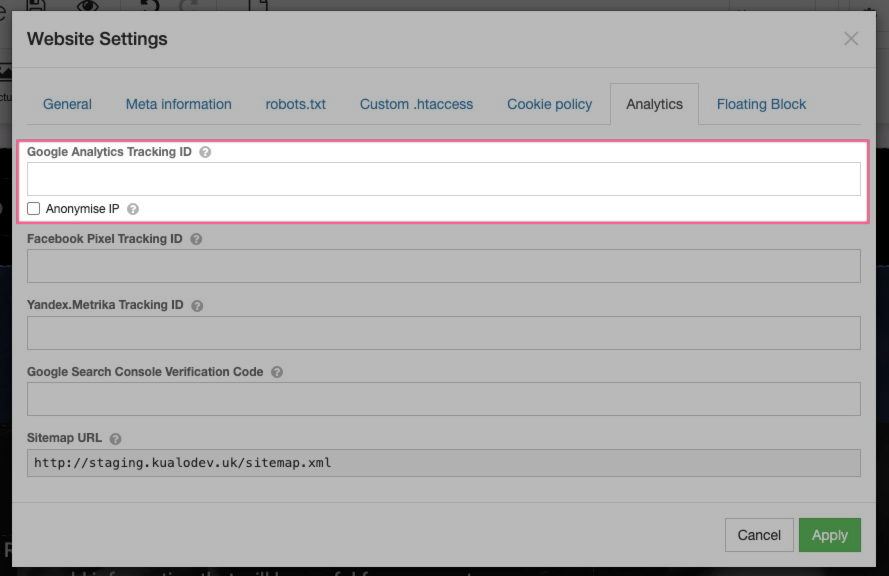
- Click Apply.
Was this helpful?
Your feedback helps us find gaps in the docs.
Thanks for the feedback!
Related articles
SEO, analytics & going live
How to optimise your site for search engines
Use the ProSite builder's SEO tab to set page titles, descriptions, keywords and user-frie...
SEO, analytics & going live
How to integrate Google Search Console
Connect Google Search Console to your ProSite website by adding your verification tag in t...
SEO, analytics & going live
How to enable HTTPS with ProSite
Learn how to fix the 'Not Secure' browser warning on your ProSite website by enabling forc...
SEO, analytics & going live
How to create a landing page in ProSite
ProSite's built-in landing page feature lets you create or convert your site into a one-pa...
Still need a hand?
Real people, around the clock - start a chat or open a ticket and we'll help you put it right.