
On this page
How to export a backup of your site to your computer
Download a local backup of your ProSite website using the Site Builder's Backup/Restore feature.
You can download a backup of your ProSite website directly to your computer at any time. Keep the file somewhere safe - you will need it if you ever want to restore your site to this point.
Steps to export your site backup
-
Log in to cPanel and launch the Site Builder tool.
-
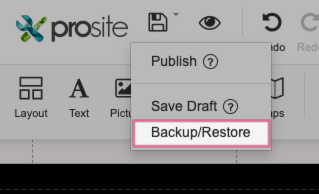
Hover over the Publish button, then choose Backup/Restore.
-
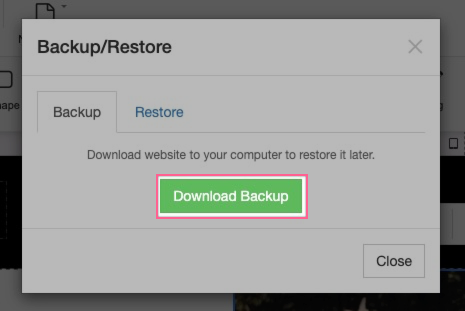
On the Backup tab, click Download Backup.
-
Wait for the backup file to finish downloading to your computer.
Store the downloaded backup file in a secure location. You will need it if you ever want to restore your site to this point.
Was this helpful?
Your feedback helps us find gaps in the docs.
Thanks for the feedback!
Related articles
Backups & importing
How to import a site backup
Restore a previous version of your ProSite website by importing a backup file or choosing...
Backups & importing
How to import an external website into ProSite
Import an existing external website into ProSite directly from the Site Builder tool in cP...
Still need a hand?
Real people, around the clock - start a chat or open a ticket and we'll help you put it right.