
On this page
How to upload a favicon
Upload a custom favicon to your ProSite site in a few quick steps using the Site Builder tool.
A favicon is the small icon that appears in browser tabs and bookmarks. Here is how to add one to your ProSite website.
Upload your favicon
- Log in to cPanel and launch the Site Builder tool.
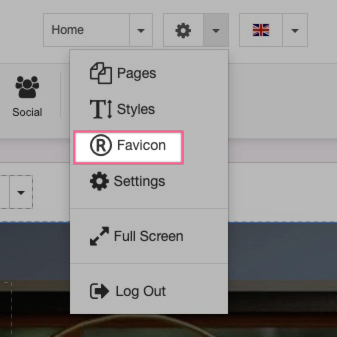
- Click the Settings icon in the top menu and choose Favicon.
- Click the Pencil icon under Favicon.
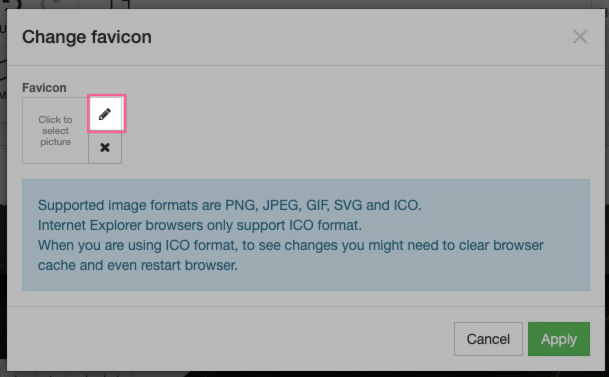
- Click Upload New Picture, browse to your favicon image file, and click Select.
- Click Apply.
Supported formats
The Site Builder accepts PNG, JPEG, GIF and ICO files. Most modern browsers support all of these formats, so any of them will work for the majority of visitors.
If you use ICO format and do not see your new favicon straight away, clear your browser cache and restart the browser.
Was this helpful?
Your feedback helps us find gaps in the docs.
Thanks for the feedback!
Related articles
Widgets & elements
How to use the image gallery widget
ProSite includes a built-in image gallery widget that makes adding image galleries to your...
Widgets & elements
How to use the map widget
Add a working Google Maps widget to your ProSite website by generating a Google Maps API k...
Widgets & elements
How to use the YouTube widget
Add a YouTube video to your ProSite page - either as a playable embed using the Media widg...
Widgets & elements
How to upload a photo
Add a photo to your ProSite page by dragging in the Picture element, then choose or upload...
Still need a hand?
Real people, around the clock - start a chat or open a ticket and we'll help you put it right.