
On this page
How to disable unrequired modules and extensions in Magento 2
Disabling unused modules and extensions in Magento 2 helps keep your store lean and fast.
Magento 2 ships with a large number of modules and extensions enabled by default. Disabling the ones you do not need is one of the simplest ways to keep your store lean and fast.
Disable modules via the Admin Panel
- Log in to the Magento Admin Panel.
- Navigate to System > Configuration.
- In the left panel, select Advanced > Advanced.
- Use the Disable Modules Output tool to toggle individual modules.
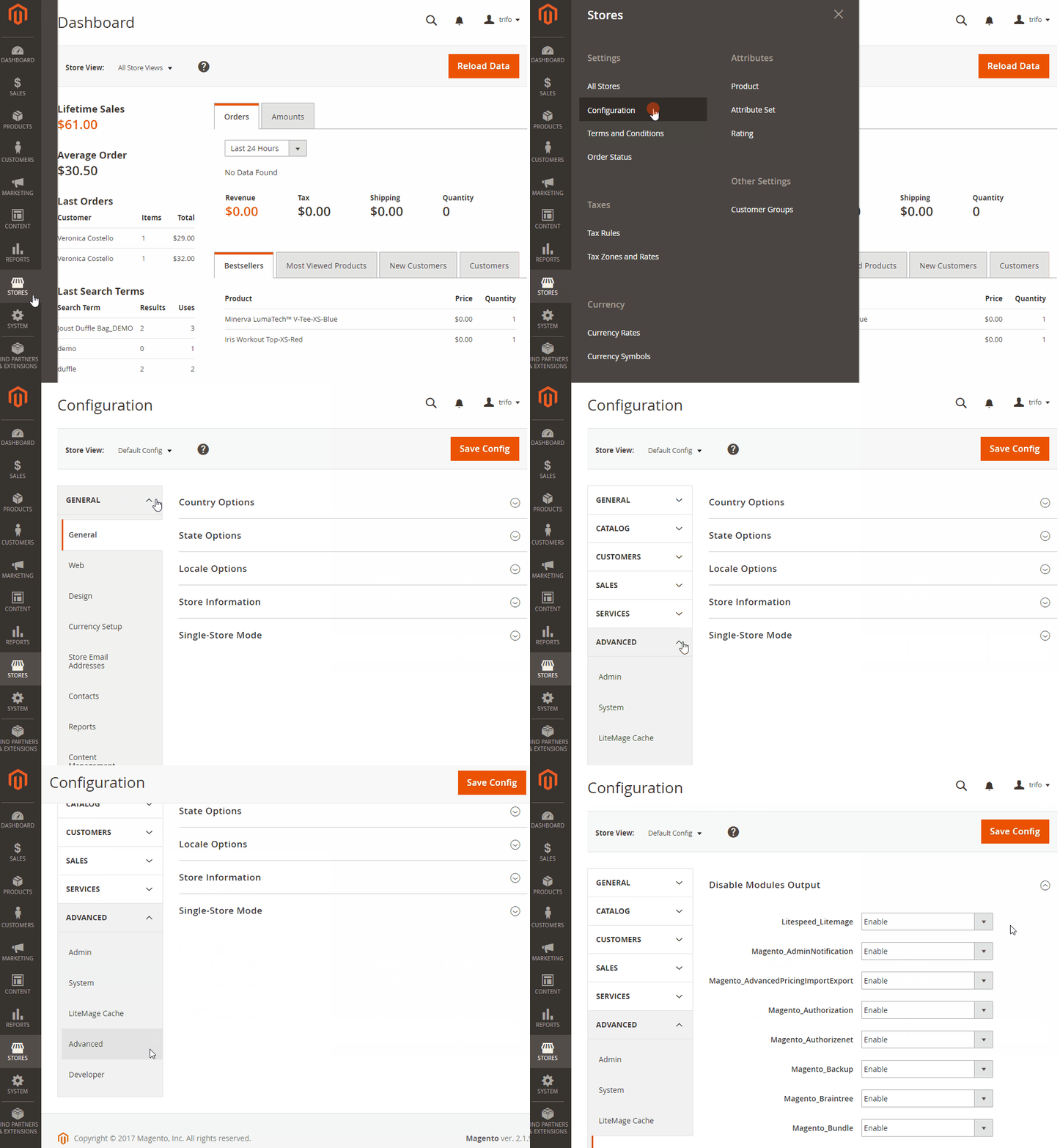
Disabling module output via the Admin Panel hides the module's frontend output but does not fully disable it at the application level. For a complete disable, use the CLI method below.
Disable modules via SSH
Connect to your account over SSH, then use the following commands.
List all enabled and disabled modules:
php bin/magento module:status
Enable one or more modules:
php bin/magento module:enable [options] <module-list>
Disable one or more modules:
php bin/magento module:disable [options] <module-list>
Where <module-list> is a space-delimited list of module names. If a module name contains special characters, wrap it in single or double quotes.
Available options
| Option | Description |
|---|---|
--all |
Enable or disable all modules at once. |
-f / --force |
Force the action even if dependency conflicts exist. Use with caution. |
-c / --clear-static-content |
Delete generated static view files after the change. |
Always use --clear-static-content when enabling or disabling modules. If you skip it and multiple static files share the same name, Magento's static file fallback rules may serve the wrong file - for example, displaying an incorrect logo.
Example: disable the Weee module
php bin/magento module:disable Magento_Weee
Update the database after enabling modules
If you have enabled one or more modules, run the following command to apply any required database changes:
php bin/magento setup:upgrade
If you need any further help, please contact us.