
On this page
How to upgrade Magento v2
There are two ways to upgrade Magento 2: via the Web Setup Wizard in the admin dashboard, or via SSH using Composer.

There are two ways to upgrade Magento 2: via the Web Setup Wizard in the admin dashboard, or via SSH using Composer. The Web Setup Wizard is the easier option, so we'll cover that first.
Web Setup Wizard
Sign in to your Magento admin dashboard, then go to System > Web Setup Wizard (under Tools):
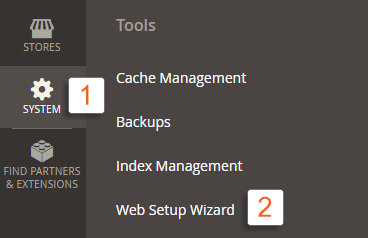
If this is your first time using the Web Setup Wizard, you will need to provide your Magento Marketplace public and private keys.
- Go to your Magento Marketplace account page.
- On the Access keys page, copy your public and private keys.
- Enter the keys in Magento when prompted.
- Click System Upgrade.
Under Magento Core Components you will see the currently installed version and the latest version available to upgrade to:
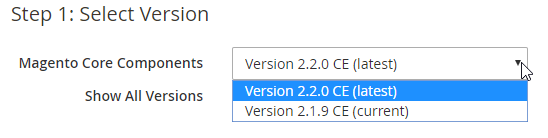
The Show All Versions option includes unstable releases. Skip this if you are upgrading a production site.
Other Components lets you upgrade Magento's additional components - modules, libraries, and language packs. Once you have made your selections, click Next:
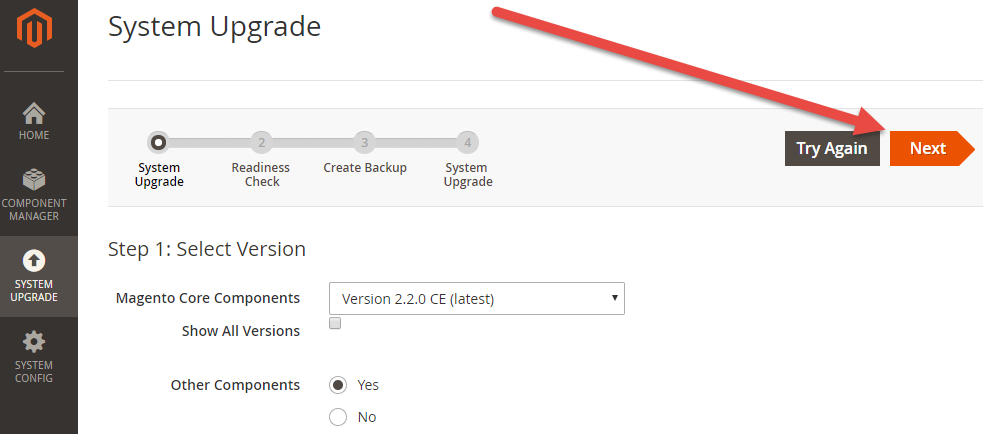
Magento will run a Readiness Check to confirm the server environment is ready for the upgrade. If everything passes, proceed to the next step, create a backup, then click Next and then Upgrade:
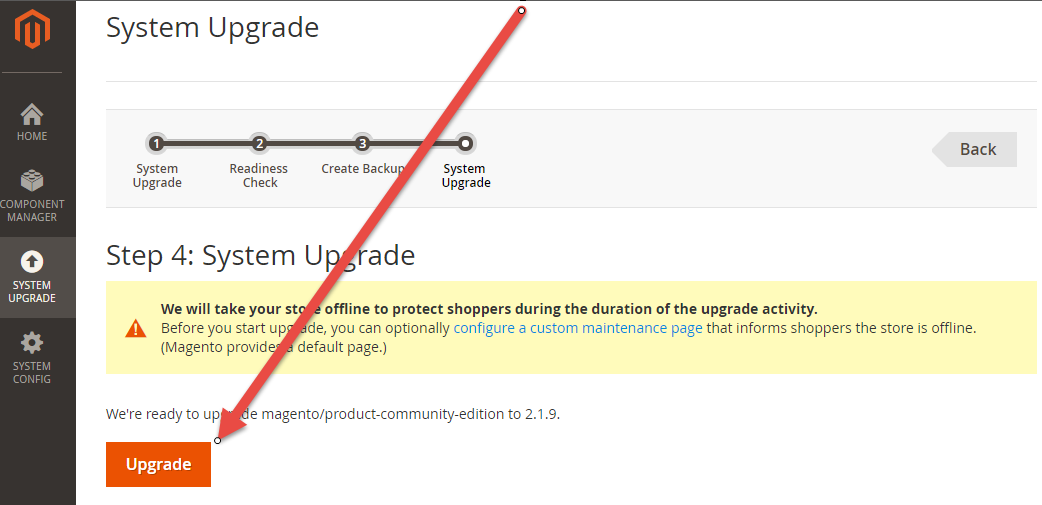
If you run into problems, make sure your Magento cron jobs are running. You can also refer to the official Magento documentation or contact us for assistance.
SSH with Composer
To upgrade Magento via SSH, connect to the server and navigate to your Magento installation directory.
If you do not have SSH access enabled, contact us and we will help you set it up.
- Require the target Magento version without running the update yet. Replace
2.x.xwith the version you want to install:
composer require magento/product-community-edition 2.x.x --no-update
- Run the Composer update. You will be prompted for your Magento Marketplace public key (username) and private key (password) to authenticate against
repo.magento.com:
composer update
- Finalise the upgrade by running the setup, compiling, and clearing the cache:
rm -rf var/generation
php bin/magento setup:upgrade
php bin/magento setup:di:compile
php bin/magento cache:clean
php bin/magento cache:flush
php bin/magento indexer:reindex
If you need any further help, please contact us.