
On this page
How to enable LiteSpeed Cache in cPanel
Enable LiteSpeed Cache in cPanel to start serving faster, dynamically cached pages on your Kualo hosting account.
LiteSpeed Cache is a high-performance, server-level page cache built into the LiteSpeed Web Server. It is available on Kualo's Performance and Reseller hosting plans.
Enabling LiteSpeed Cache in cPanel
-
Navigate to Software > LiteSpeed Cache, or type
litespeedinto the search bar at the top of cPanel.
-
Click Enable LiteSpeed Cache.
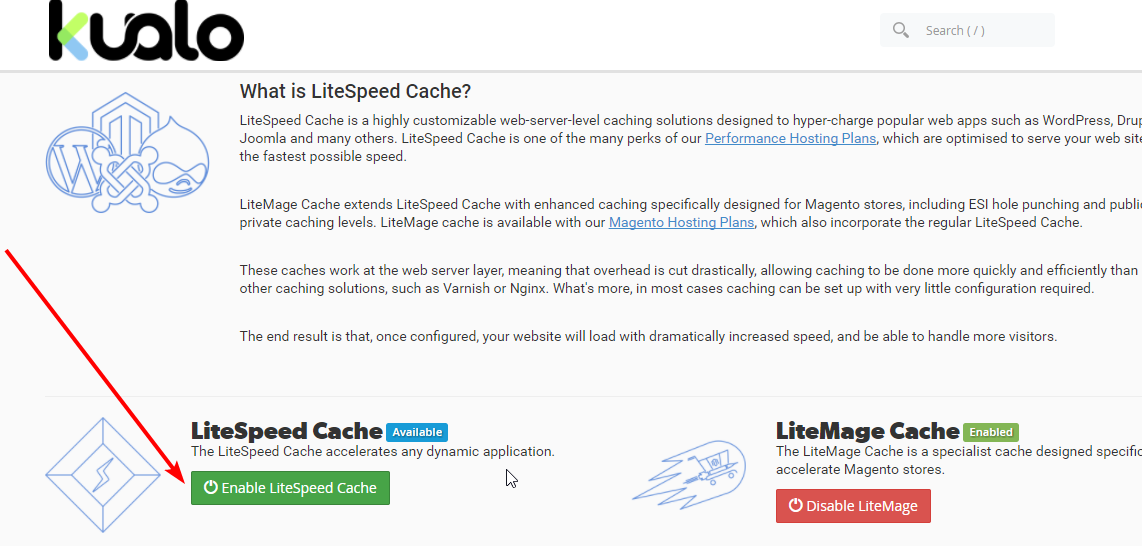
LiteSpeed Cache is now active on your hosting account.
Next steps
Once enabled, you can integrate LiteSpeed Cache with your WordPress website to start improving page load times.
Was this helpful?
Your feedback helps us find gaps in the docs.
Thanks for the feedback!
Related articles
LiteSpeed Cache
What is LiteSpeed Cache?
LiteSpeed Cache is a high-performance, server-level page cache built directly into LiteSpe...
LiteSpeed Cache
Verify if LiteSpeed Cache is working
Check whether LiteSpeed Cache is active by inspecting the response headers returned by you...
LiteSpeed Cache
Public cache vs. private cache
Understand when LiteSpeed Cache should use a public cache, a private cache, or no cache at...
LiteSpeed Cache
Configuring LiteSpeed Cache with WordPress
Learn how to install and configure LiteSpeed Cache for WordPress, from enabling it in cPan...
Still need a hand?
Real people, around the clock - start a chat or open a ticket and we'll help you put it right.