
On this page
Previewing your website with SkipDNS
Use SkipDNS to preview your website on Kualo before repointing your domain, with no DNS changes required.
When migrating to Kualo or setting up a new website, you may want to preview the site before repointing your domain. SkipDNS is a proxy service that lets you do this without touching your DNS settings or hosts file.
Understanding SkipDNS
SkipDNS routes your browser traffic through its own servers so you can view a site at a specific IP address under your real domain name. It is well suited to visual and functional checks, but because traffic passes through a third-party proxy, browsing speeds will be slower than normal. If you need to test actual connection speed and performance, use the hosts file method instead, which gives a more accurate picture of the live site.
Finding your website's IP address
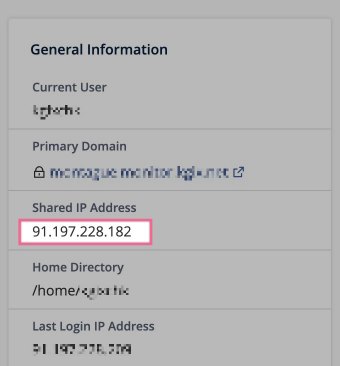
Before using SkipDNS you need your server's IP address. You can find it in cPanel under the General Information panel on the right-hand side of the home screen.
Using SkipDNS step by step
- Open your browser and go to https://www.skipdns.link/.
- In the first dropdown, select Regular website.
- Enter the IP address you copied from cPanel in the IP Address field.
- Enter your domain name in the Domain name field. You do not need to include
www. - In the next dropdown, select Over regular ports.
- Click Go. SkipDNS will generate a unique preview URL.
- Open the generated URL to see your site as it appears on the Kualo server.
Things to keep in mind
- Use the correct IP address. Double-check the IP you copied from cPanel before submitting the form.
- Expect slower speeds. SkipDNS is a proxy, so page load times will not reflect real-world performance. Use it for visual and functional checks only.
- Test across browsers and devices. The preview URL works in any browser, so take the opportunity to check your site on different screen sizes.
For a more accurate performance test, use the hosts file method, which bypasses DNS locally without routing through a third-party proxy.