
On this page
How do I update my credit card?
You can update or remove your stored credit card at any time from the Kualo client area.
You can update or remove your stored credit card at any time by logging into the Kualo client area.
Updating your card
- Log into the Kualo client area at https://my.kualo.com.
- Click Billing > Manage Credit Card.
- You will see a screen similar to the one below:
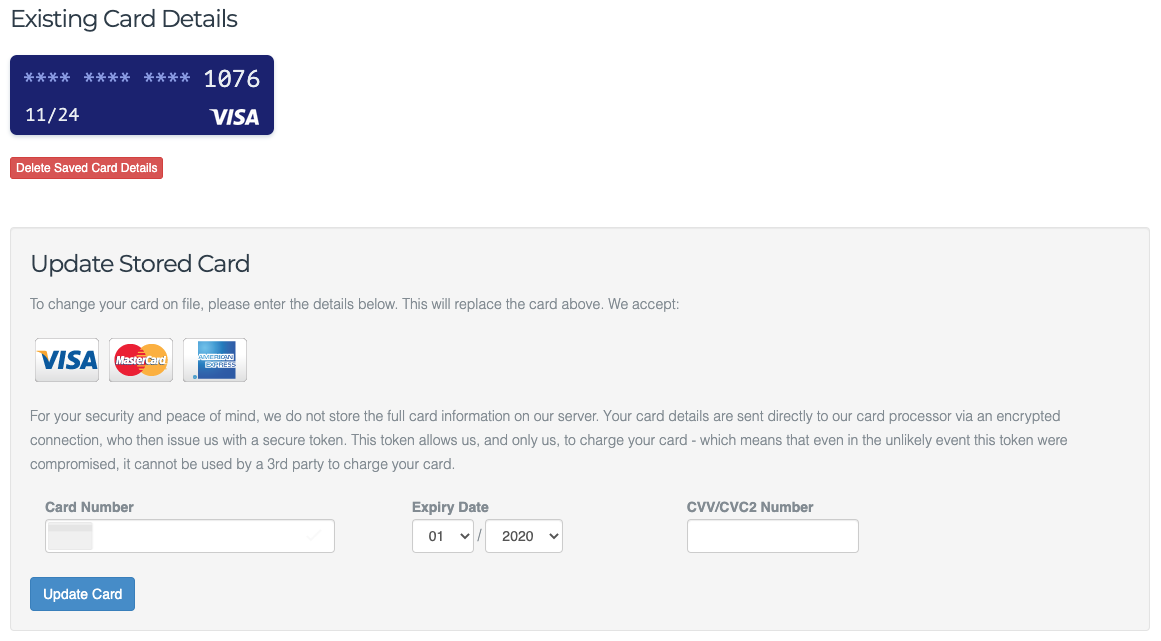
- From this screen you can remove your existing card completely, or replace it with a new one.
We accept Visa, Mastercard and American Express. You can store one card at a time.
Was this helpful?
Your feedback helps us find gaps in the docs.
Thanks for the feedback!
Related articles
Billing & payments
Understanding Kualo's billing cycles for hosting
Choosing the right billing cycle is one of the first decisions you make when you sign up f...
Billing & payments
VAT and tax on Kualo invoices
This article explains how VAT is calculated on Kualo invoices, including rules for UK cust...
Billing & payments
How to update your billing address and company details
Keep your billing name, address, company name, and VAT number accurate in MyKualo so your...
Billing & payments
How to request a refund from Kualo
Find out what our refund policy covers, how our 60-day money-back guarantee works, and how...
Still need a hand?
Real people, around the clock - start a chat or open a ticket and we'll help you put it right.