# Setting up log retention in Magento v2
> Keep Magento v2 log files under control by scheduling a cPanel cron job to archive or truncate them regularly.
Source: https://www.kualo.com/knowledgebase/magento-performance/setting-up-log-retention-in-magento-v2
Updated: 2026-06-09
---
Magento v2 does not let you disable system and exception logs, so over time those files can grow to several gigabytes - a real problem if you are on a plan with limited disk space. A cPanel cron job is the cleanest way to keep them under control.
 ## Option 1: archive the logs (recommended)
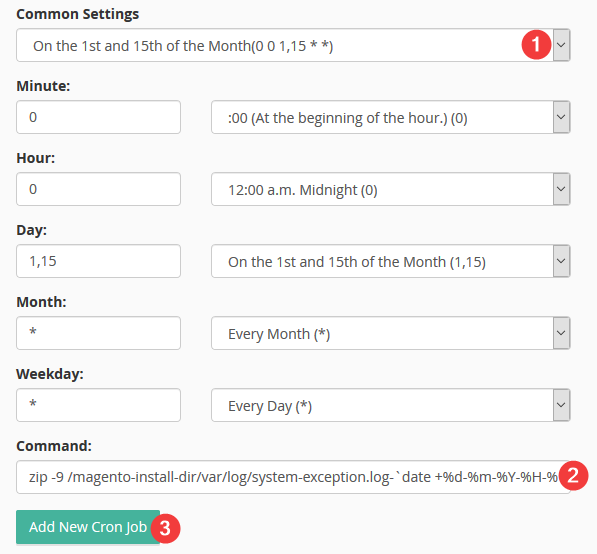
This command compresses both log files into a dated zip archive, then leaves the originals in place. Compression typically reduces log file size by over 90%.
```bash
zip -9 /magento-install-dir/var/log/system-exception.log-`date +%d-%m-%Y-%H-%M`.zip /magento-install-dir/var/log/system.log /magento-install-dir/var/log/exception.log
```
Replace `magento-install-dir` with the actual path to your Magento installation.
A good schedule is the 1st and 15th of each month (cron expression: `0 0 1,15 * *`).
## Option 1: archive the logs (recommended)
This command compresses both log files into a dated zip archive, then leaves the originals in place. Compression typically reduces log file size by over 90%.
```bash
zip -9 /magento-install-dir/var/log/system-exception.log-`date +%d-%m-%Y-%H-%M`.zip /magento-install-dir/var/log/system.log /magento-install-dir/var/log/exception.log
```
Replace `magento-install-dir` with the actual path to your Magento installation.
A good schedule is the 1st and 15th of each month (cron expression: `0 0 1,15 * *`).
 ## Option 2: truncate the logs (no archive kept)
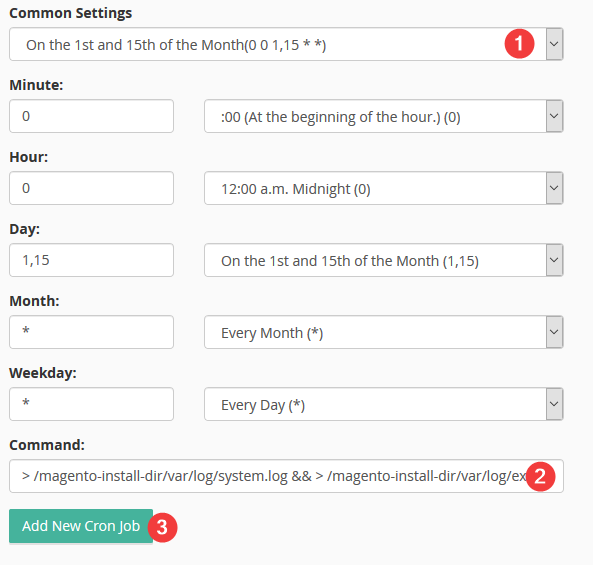
If you do not need to retain a copy, this command simply empties both log files:
```bash
> /magento-install-dir/var/log/system.log && > /magento-install-dir/var/log/exception.log
```
Replace `magento-install-dir` with the actual path to your Magento installation.
## Option 2: truncate the logs (no archive kept)
If you do not need to retain a copy, this command simply empties both log files:
```bash
> /magento-install-dir/var/log/system.log && > /magento-install-dir/var/log/exception.log
```
Replace `magento-install-dir` with the actual path to your Magento installation.
 ## Setting up the cron job in cPanel
1. Log in to cPanel and open **Cron Jobs**.
2. Choose your preferred frequency, or enter a custom cron expression.
3. Paste the command for your chosen option into the **Command** field.
4. Click **Add New Cron Job**.
:::tip
If you are unsure of your Magento installation path, check the file manager in cPanel or run `pwd` from within the Magento root directory via SSH.
:::
If you need any further help, please [contact us](https://www.kualo.com/company/contact).
---
_Source: Kualo Knowledgebase — https://www.kualo.com/knowledgebase/magento-performance/setting-up-log-retention-in-magento-v2 · © Kualo Ltd._
## Setting up the cron job in cPanel
1. Log in to cPanel and open **Cron Jobs**.
2. Choose your preferred frequency, or enter a custom cron expression.
3. Paste the command for your chosen option into the **Command** field.
4. Click **Add New Cron Job**.
:::tip
If you are unsure of your Magento installation path, check the file manager in cPanel or run `pwd` from within the Magento root directory via SSH.
:::
If you need any further help, please [contact us](https://www.kualo.com/company/contact).
---
_Source: Kualo Knowledgebase — https://www.kualo.com/knowledgebase/magento-performance/setting-up-log-retention-in-magento-v2 · © Kualo Ltd._